Resume template · Updated October 2026
iOS developer resume template
Short answer
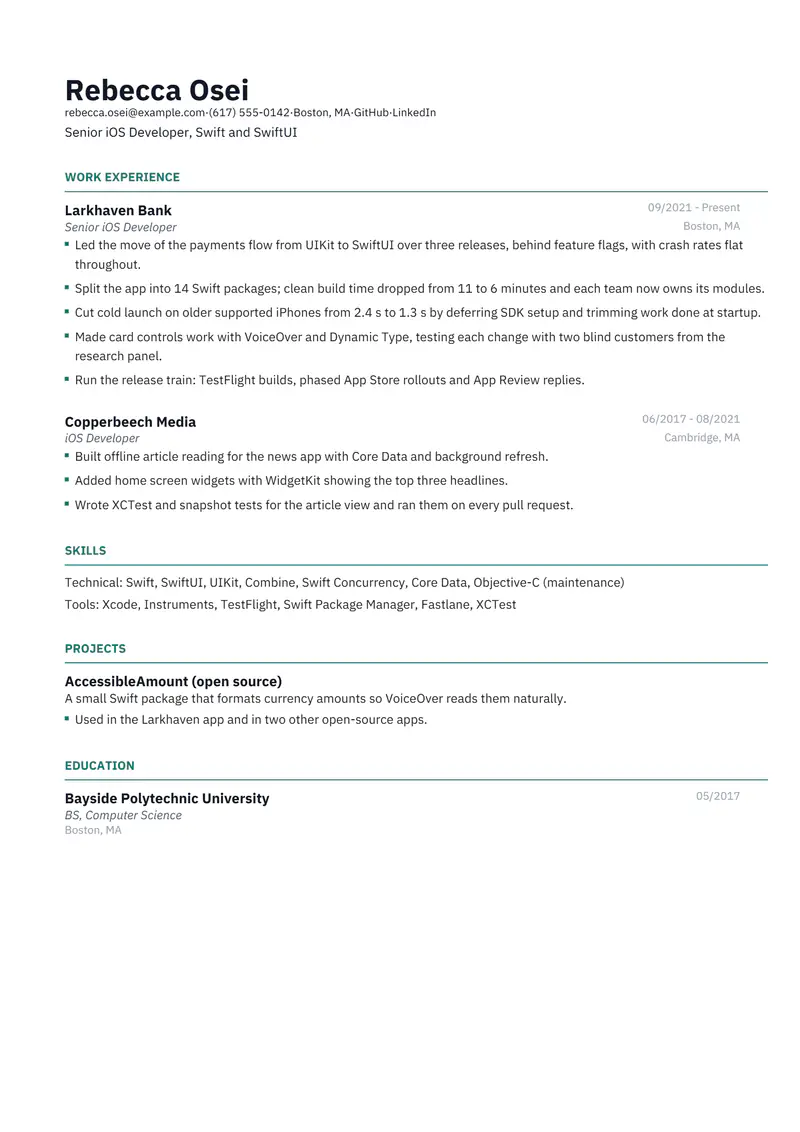
Catalyst suits a senior iOS developer because it skips the summary and opens on your current job, where the big work usually sits. The fictional sample spent five years on a banking app: moving payments from UIKit to SwiftUI, splitting the app into Swift packages, cutting cold launch time and running the App Store release train. An open-source Swift package sits in Projects.
Download the iOS developer sample
Rebecca is a fictional senior iOS developer. Replace every detail with your own before you send it.
The files are made in your browser by Resumity's own exporters, from this sample. The builder opens it as your own resume: click any line to replace it. Free plan, no watermark.
Why Catalyst suits an iOS developer resume
Catalyst goes from the header straight to work experience and prints no summary, so a reader meets the SwiftUI migration and launch-time work in the first lines. That fits a senior developer whose latest role carries the application, and the IBM Plex Sans type with teal headings gives it a crisp, engineered look.
Second choice: Leslie. Leslie keeps a summary and still prints experience ahead of skills under a blue header; choose it if you want two sentences of context first.
What goes in each section, in Catalyst's order
Catalyst prints its sections in a fixed order, the same in the PDF and the Word file. Here is that order for this sample, and what to put in each section.
- Work Experience. The headline replaces the missing summary, so make it specific: "Senior iOS Developer, Swift and SwiftUI". In each role, name Apple frameworks inside the bullets (SwiftUI, WidgetKit, Core Data) and measure what users feel: launch time, crash rate, accessibility, release cadence.
- Skills. Catalyst prints labelled rows after the jobs. Technical holds Swift, SwiftUI, UIKit, Combine and Swift Concurrency; Tools holds Xcode, Instruments, TestFlight and your CI. Add Objective-C with the level you have, since many teams still maintain some.
- Projects. An open-source Swift package, a public TestFlight beta or a published app gives a reviewer code to read. Say what it does and one sign of use: stars, installs or adoption by other apps.
- Education. One line at the bottom. For senior iOS roles the degree is a formality.
The sample resume as text
The same content as the files above, so you can copy a line or compare it with your own.
Rebecca Osei
Senior iOS Developer, Swift and SwiftUI
Boston, MA | rebecca.osei@example.com | (617) 555-0142 | github.com/sample-rebecca-osei | linkedin.com/in/sample-rebecca-osei
Experience
Senior iOS Developer, Larkhaven Bank, Boston, MA (09/2021 to Present)
- Led the move of the payments flow from UIKit to SwiftUI over three releases, behind feature flags, with crash rates flat throughout.
- Split the app into 14 Swift packages; clean build time dropped from 11 to 6 minutes and each team now owns its modules.
- Cut cold launch on older supported iPhones from 2.4 s to 1.3 s by deferring SDK setup and trimming work done at startup.
- Made card controls work with VoiceOver and Dynamic Type, testing each change with two blind customers from the research panel.
- Run the release train: TestFlight builds, phased App Store rollouts and App Review replies.
iOS Developer, Copperbeech Media, Cambridge, MA (06/2017 to 08/2021)
- Built offline article reading for the news app with Core Data and background refresh.
- Added home screen widgets with WidgetKit showing the top three headlines.
- Wrote XCTest and snapshot tests for the article view and ran them on every pull request.
Projects
AccessibleAmount (open source): A small Swift package that formats currency amounts so VoiceOver reads them naturally.
- Used in the Larkhaven app and in two other open-source apps.
Education
BS, Computer Science, Bayside Polytechnic University (05/2017)
Skills
Swift, SwiftUI, UIKit, Combine, Swift Concurrency, Core Data, Objective-C (maintenance), Xcode, Instruments, TestFlight, Swift Package Manager, Fastlane, XCTest
How to make the sample yours
Name the migration you actually led
If yours was Objective-C to Swift, CocoaPods to Swift Package Manager or completion handlers to async/await, rebuild the first bullet around it. Say how you protected users along the way (feature flags, phased rollout).
Measure launch and crashes on a named device class
The sample cuts cold launch from 2.4 to 1.3 seconds on older supported iPhones. Take your figures from Instruments or the Xcode Organizer and say which devices, because an old phone tells a different story from a new one.
Keep the accessibility bullet if it is real
VoiceOver and Dynamic Type support come up often in iOS interviews. Describe what you changed and how you tested it.
Show release ownership
TestFlight groups, phased releases and App Review replies: if you run releases, keep that bullet. If someone else does, replace it with your part of the process.
Shrink the older job
Your first iOS role can drop to two or three bullets once a senior position sits above it.
Keywords to keep where they are true
Terms this kind of resume is usually searched for. Use the posting's exact wording, and only for work you have done.
- iOS development
- Swift
- SwiftUI
- UIKit
- Combine
- Swift Concurrency
- async/await
- Core Data
- XCTest
- Instruments
- TestFlight
- App Store Connect
- Swift Package Manager
- VoiceOver accessibility
Mistakes to avoid
- A summary paragraph in Catalyst: it does not print one. Put your level and stack in the headline instead.
- Bullets that list Apple frameworks without saying what you built with them.
- Claiming SwiftUI depth when every screen you shipped was UIKit. Write "SwiftUI in new features" if that is the truth.
- Ignoring the App Store side. Signing, review and releases are part of the job.
How the sample PDF reads in text extractors
We exported this sample with Resumity's PDF exporter in Chrome on 2026-10-29 and read the file back with three open-source text extractors. This shows whether software that turns a PDF into text can recover it; it is not a test of any commercial applicant tracking system. How we test templates.
| Extractor | Name, email, phone | Headings | Bullets intact |
|---|---|---|---|
| pdf.js 4.10.38 | All found | 4 of 4 | 9 of 9 |
| pdftotext (Xpdf) 4.00 | All found | 4 of 4 | 9 of 9 |
| pypdf 6.13.0 | All found | 4 of 4 | 9 of 9 |
Frequently asked questions
Should an iOS developer list Objective-C?
Yes, if you can read and maintain it. Many older apps still contain some, and writing "Objective-C (maintenance)" sets the right expectation.
How do I show App Store releases on a resume?
In a bullet about the release process: how often you ship, who runs TestFlight and phased rollouts, and how you handle App Review. Add a public app as a portfolio link if you can.
Do I need a degree to get hired as an iOS developer?
Many teams hire on shipped apps and readable code. Catalyst prints whatever education you list after Projects, and a course or no entry at all is fine.
How do I show seniority beyond writing features?
Migrations you led, modules you designed, release trains you ran and people you mentored. Each is a bullet a hiring manager reads as senior scope.
Will applicant tracking systems read this Catalyst PDF?
The sample PDF read back with its contact details, all 4 section headings and all 9 bullets intact in three open-source text extractors (pdf.js, pdftotext and pypdf). Commercial systems such as Workday, Greenhouse or Taleo were not tested, and each employer configures its own.
Guides and templates for this resume
More in resume templates by job title.