Resume template · Updated October 2026
Black and white resume template that copies cleanly
Short answer
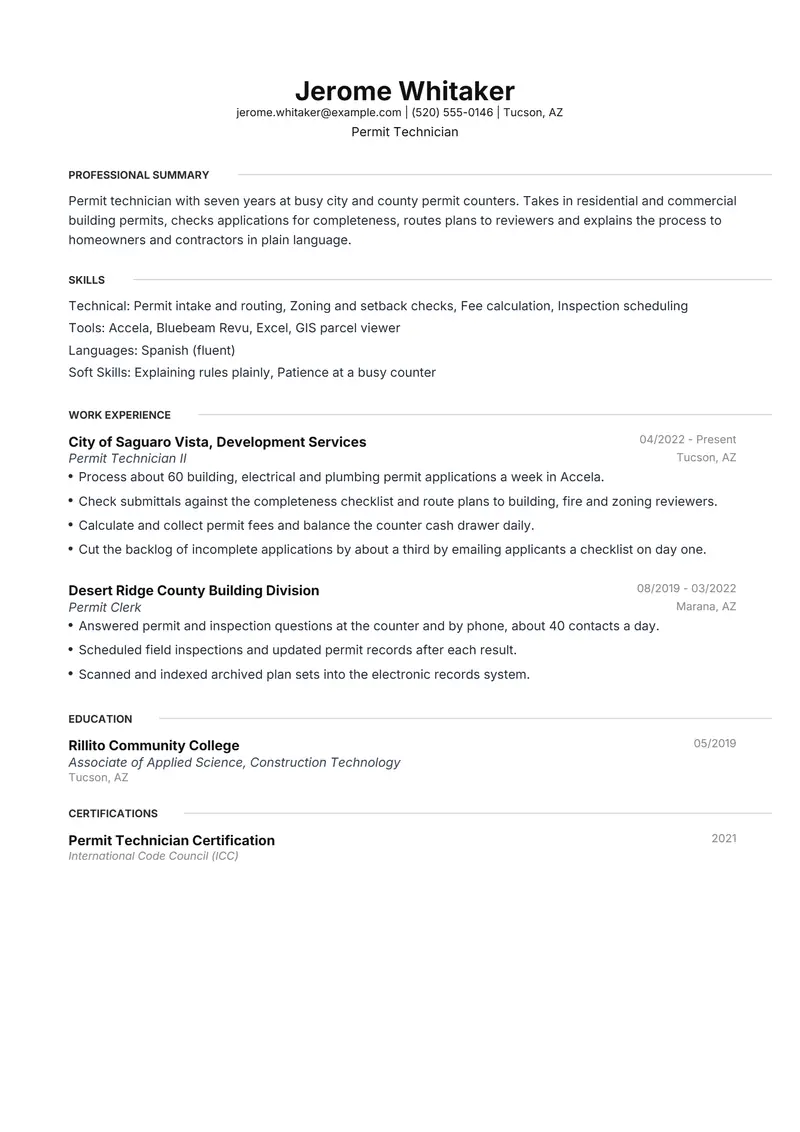
Meridian is Resumity's black-and-white template: no colour anywhere, only dark type, grey dates and thin grey rules, so it looks the same from a home printer, an office photocopier or a screen. Henrietta and FAANGPath are also black and grey. The fictional sample is a permit technician applying to a city building department, where each member of a hiring panel may read a printed copy.
Download the black and white sample
Jerome is a fictional permit technician. Replace every detail with your own before you send it.
The files are made in your browser by Resumity's own exporters, from this sample. The builder opens it as your own resume: click any line to replace it. Free plan, no watermark.
Why Meridian suits a black and white resume
Meridian has no colour at all: a centred black name, small-capital headings followed by thin grey rules, and grey dates on the right. Nothing on it depends on colour to be read, so a photocopy handed to each panel member looks like the original, and the skills sit above experience where the permit software and procedures are seen early.
Second choice: Henrietta. Henrietta is equally free of colour, with a left-aligned name, hairline rules and education right after experience; it suits readers who expect a traditional business layout.
What goes in each section, in Meridian's order
Meridian prints its sections in a fixed order, the same in the PDF and the Word file. Here is that order for this sample, and what to put in each section.
- Professional Summary. Name the permit types you process and the systems you use, in the words of the job announcement. A printed resume read beside the announcement should make the match obvious without a highlighter.
- Skills. Three labelled rows in dark type. With no colour to separate them, short item names do the work, so try to keep each row to a single line.
- Work Experience. Volumes and turnaround times suit counter work: applications per week, plan sets routed, days to issue. Short bullets also leave room in the margins for a panel member taking notes with a pen.
- Education. One line per qualification. A construction technology certificate or a related associate degree is relevant to permit work; give the school and year.
- Certifications. Code or permit credentials with the issuing body and year. Meridian prints them after education, so if the posting lists one as preferred, name it in the summary too.
The sample resume as text
The same content as the files above, so you can copy a line or compare it with your own.
Jerome Whitaker
Permit Technician
Tucson, AZ | jerome.whitaker@example.com | (520) 555-0146
Permit technician with seven years at busy city and county permit counters. Takes in residential and commercial building permits, checks applications for completeness, routes plans to reviewers and explains the process to homeowners and contractors in plain language.
Experience
Permit Technician II, City of Saguaro Vista, Development Services, Tucson, AZ (04/2022 to Present)
- Process about 60 building, electrical and plumbing permit applications a week in Accela.
- Check submittals against the completeness checklist and route plans to building, fire and zoning reviewers.
- Calculate and collect permit fees and balance the counter cash drawer daily.
- Cut the backlog of incomplete applications by about a third by emailing applicants a checklist on day one.
Permit Clerk, Desert Ridge County Building Division, Marana, AZ (08/2019 to 03/2022)
- Answered permit and inspection questions at the counter and by phone, about 40 contacts a day.
- Scheduled field inspections and updated permit records after each result.
- Scanned and indexed archived plan sets into the electronic records system.
Education
Associate of Applied Science, Construction Technology, Rillito Community College (05/2019)
Certifications
- Permit Technician Certification, International Code Council (ICC) (2021)
Skills
Permit intake and routing, Zoning and setback checks, Fee calculation, Inspection scheduling, Accela, Bluebeam Revu, Excel, GIS parcel viewer, Explaining rules plainly, Patience at a busy counter, Spanish (fluent)
How to make the sample yours
Print a test copy in greyscale
Before an in-person interview, print the page on an ordinary office printer and photocopy it once. Check that the grey dates and rules still show and nothing looks faint.
Leave the accent at its default
The editor's Accent Color setting can recolour headings and bullet markers. For a strictly black-and-white page, keep Meridian's default near-black.
Let spacing replace colour
A page without colour relies on headings and white space to separate sections. Keep bullets to one or two lines and leave out optional sections, so each block stands apart.
Swap in your own public-sector detail
A planning assistant, code enforcement officer or records clerk can keep this shape: the counter or desk you staff, the volumes you handle, the systems you use and one credential.
Bring enough copies
For a panel interview, bring one copy per panel member and one for yourself. A clean black-and-white page copies well if someone needs another.
Keywords to keep where they are true
Terms this kind of resume is usually searched for. Use the posting's exact wording, and only for work you have done.
- permit technician
- permit intake
- plan review routing
- building permits
- zoning review
- inspection scheduling
- fee calculation
- public counter
- customer service
- Accela
- records management
- building codes
- ICC certification
Mistakes to avoid
- Printing a coloured template on a black-and-white printer. Light blue or teal can come out pale grey and harder to read.
- Picking a pale accent colour in the editor. Headings and bullets in light grey or yellow fade badly on a photocopy.
- Adding rows of symbols or characters to divide sections. The template's rules already do that job.
- Assuming black and white has to be dull. Specific volumes and named systems are what make a reader stop.
How the sample PDF reads in text extractors
We exported this sample with Resumity's PDF exporter in Chrome on 2026-10-29 and read the file back with three open-source text extractors. This shows whether software that turns a PDF into text can recover it; it is not a test of any commercial applicant tracking system. How we test templates.
| Extractor | Name, email, phone | Headings | Bullets intact |
|---|---|---|---|
| pdf.js 4.10.38 | All found | 5 of 5 | 7 of 7 |
| pdftotext (Xpdf) 4.00 | All found | 5 of 5 | 7 of 7 |
| pypdf 6.13.0 | All found | 5 of 5 | 7 of 7 |
Frequently asked questions
Is a black and white resume better than a coloured one?
Neither wins by default. Black and white is the safer choice when your resume is likely to be printed or copied, or when the employer is conservative; a single accent colour is fine for screen reading in most other settings.
Which Resumity templates are black and white?
Meridian, Henrietta and FAANGPath use only black and grey. Daniel adds light grey heading pills, Catalyst uses teal, and Leslie and Olivia use blue.
Can I turn a coloured template into black and white?
Only partly. The Accent Color setting recolours section headings and bullet markers, so you can set them to near-black, but the header keeps its design: Leslie's name stays blue and Olivia's band stays a solid blue block. Starting from a black-and-grey template is simpler.
Will a resume without colour look too plain?
Not if the content is specific. Clear headings, consistent dates and short bullets with real numbers give a monochrome page all the structure it needs.
What paper should I print it on?
Plain white or off-white paper gives black type the most contrast. Heavier paper is optional; a clean, well-printed page matters more than its weight.
Will applicant tracking systems read this Meridian PDF?
The sample PDF read back with its contact details, all 5 section headings and all 7 bullets intact in three open-source text extractors (pdf.js, pdftotext and pypdf). Commercial systems such as Workday, Greenhouse or Taleo were not tested, and each employer configures its own.
Guides and templates for this resume
- Resume Format Guide: How to Choose One
- Resume Paper: Weight, Color, Cotton and Where to Print
- How many resumes to bring
- Government job resume format: when a sarkari job needs a resume
- Meridian resume template
- Gray accent resume template with soft grey headings
- Blue accent resume template with one restrained colour
More in resume template styles.