Resume template · Updated October 2026
Administrative assistant resume template
Short answer
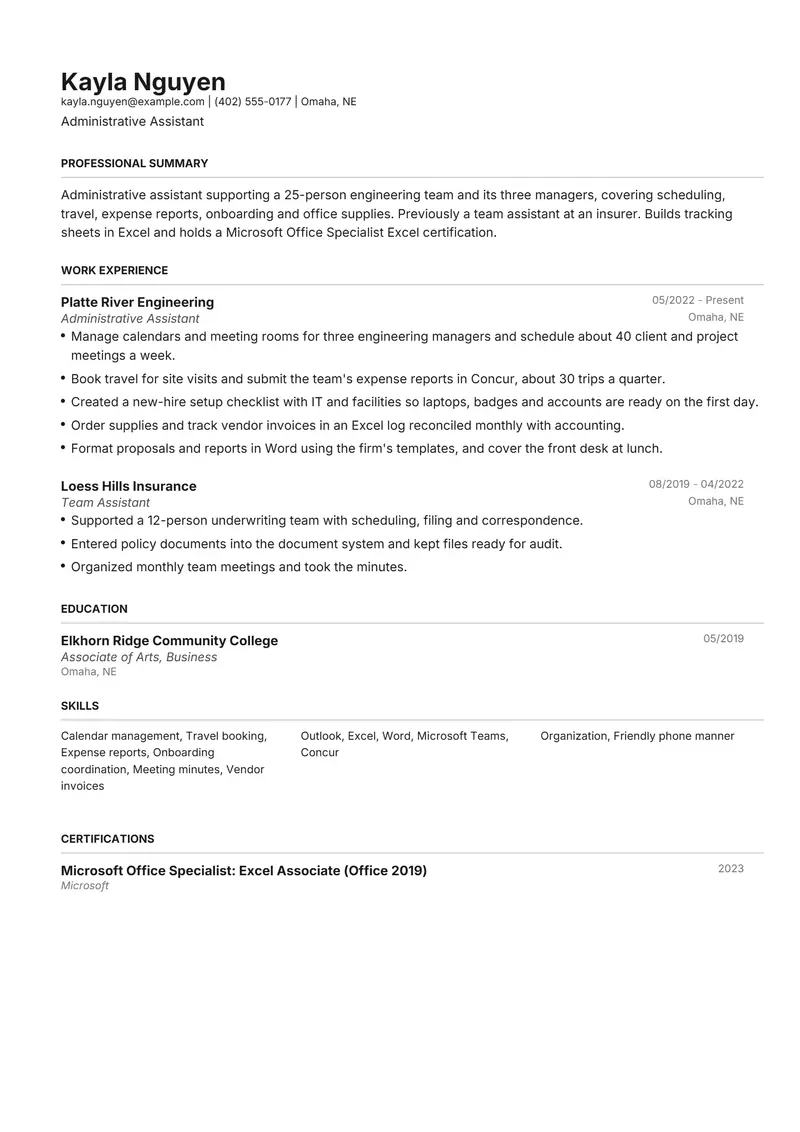
Henrietta suits an administrative assistant: a conventional page with a three-column skills grid that fits the many short tools and tasks the job involves, from Outlook and Concur to scheduling and onboarding. The fictional sample supports a 25-person engineering team after working as a team assistant at an insurer, and holds a Microsoft Office Specialist Excel certification. Office administrators and team assistants can use the same page.
Download the administrative assistant sample
Kayla is a fictional administrative assistant. Replace every detail with your own before you send it.
The files are made in your browser by Resumity's own exporters, from this sample. The builder opens it as your own resume: click any line to replace it. Free plan, no watermark.
Why Henrietta suits an administrative assistant resume
Henrietta's three-column skills grid fits an administrative assistant's long list of short items (Outlook, Excel, Concur, scheduling, travel, onboarding) without spilling onto a second page. It is a conventional black-and-grey business layout that suits any office, and education prints right after experience, keeping a short diploma or associate degree line close to the jobs.
Second choice: Meridian. Meridian is just as plain and puts skills above experience, useful when a posting screens first for Excel or a specific scheduling tool.
What goes in each section, in Henrietta's order
Henrietta prints its sections in a fixed order, the same in the PDF and the Word file. Here is that order for this sample, and what to put in each section.
- Professional Summary. Who you support (one manager, a team, a department), the size of the group and the work you own. "Supports a 25-person engineering team: scheduling, travel, onboarding and supplies" places you quickly.
- Work Experience. Show range and improvement: calendars for several managers, travel and expenses, onboarding, vendor orders, document work. Add one bullet where you made something run better, such as a shared booking system or a faster new-hire setup.
- Education. Highest education with the year: high school diploma, associate or bachelor's degree. Office administration courses can go here too.
- Skills. Software first (Outlook, Excel, Word, Teams, an expense or booking tool), then office tasks, then a couple of soft skills. The grid has no labels, so lead with what the posting names.
- Certifications. Software certifications such as Microsoft Office Specialist, with the exact title and year. Microsoft lists a renewal frequency for MOS certifications, so check the date on your own credential.
The sample resume as text
The same content as the files above, so you can copy a line or compare it with your own.
Kayla Nguyen
Administrative Assistant
Omaha, NE | kayla.nguyen@example.com | (402) 555-0177
Administrative assistant supporting a 25-person engineering team and its three managers, covering scheduling, travel, expense reports, onboarding and office supplies. Previously a team assistant at an insurer. Builds tracking sheets in Excel and holds a Microsoft Office Specialist Excel certification.
Experience
Administrative Assistant, Platte River Engineering, Omaha, NE (05/2022 to Present)
- Manage calendars and meeting rooms for three engineering managers and schedule about 40 client and project meetings a week.
- Book travel for site visits and submit the team's expense reports in Concur, about 30 trips a quarter.
- Created a new-hire setup checklist with IT and facilities so laptops, badges and accounts are ready on the first day.
- Order supplies and track vendor invoices in an Excel log reconciled monthly with accounting.
- Format proposals and reports in Word using the firm's templates, and cover the front desk at lunch.
Team Assistant, Loess Hills Insurance, Omaha, NE (08/2019 to 04/2022)
- Supported a 12-person underwriting team with scheduling, filing and correspondence.
- Entered policy documents into the document system and kept files ready for audit.
- Organized monthly team meetings and took the minutes.
Education
Associate of Arts, Business, Elkhorn Ridge Community College (05/2019)
Certifications
- Microsoft Office Specialist: Excel Associate (Office 2019), Microsoft (2023)
Skills
Calendar management, Travel booking, Expense reports, Onboarding coordination, Meeting minutes, Vendor invoices, Outlook, Excel, Word, Microsoft Teams, Concur, Organization, Friendly phone manner
How to make the sample yours
Say who you support
Replace the 25 engineers and three managers with your own group. Supporting one executive, a team or a whole office are different jobs, and team assistant and office administrator postings say which they need.
Name your expense and booking tools
Concur, Expensify, Navan, Outlook room booking: list the ones you used, since many postings name one.
Show one improvement
The sample made first-day setup reliable with a checklist. Replace it with something you changed: a filing system, a supply ordering routine, a shared calendar.
Give your Excel level a real example
Write what you build (tracking sheets, pivot table summaries, mail merges) rather than "proficient in Excel".
Use the posting's title in the headline
Administrative assistant, office administrator and team assistant often cover the same work. Keep past titles as they were and match the target title in your headline.
Keywords to keep where they are true
Terms this kind of resume is usually searched for. Use the posting's exact wording, and only for work you have done.
- administrative support
- calendar management
- meeting scheduling
- travel arrangements
- expense reports
- onboarding coordination
- office supplies
- document preparation
- data entry
- Microsoft Outlook
- Microsoft Excel
- Concur
- front desk coverage
- vendor coordination
Mistakes to avoid
- "Performed various administrative duties" with no group, volume or tool.
- Listing every Office program at the same level; say what you produce in the ones you know well.
- Leaving out the team or department you supported, which is how readers judge scope.
- A two-page resume for two or three administrative roles; one page is enough.
How the sample PDF reads in text extractors
We exported this sample with Resumity's PDF exporter in Chrome on 2026-10-29 and read the file back with three open-source text extractors. This shows whether software that turns a PDF into text can recover it; it is not a test of any commercial applicant tracking system. How we test templates.
| Extractor | Name, email, phone | Headings | Bullets intact |
|---|---|---|---|
| pdf.js 4.10.38 | All found | 5 of 5 | 8 of 8 |
| pdftotext (Xpdf) 4.00 | All found | 5 of 5 | 8 of 8 |
| pypdf 6.13.0 | All found | 5 of 5 | 8 of 8 |
Frequently asked questions
What skills should an administrative assistant list?
The software you use daily (Outlook, Excel, Word, Teams, an expense tool), the tasks you handle (scheduling, travel, onboarding, ordering) and two or three soft skills. Put the ones the posting names first.
Office administrator, team assistant or administrative assistant: which title should I use?
Keep your real past titles and use the posting's title in your headline. The work overlaps heavily; the summary and bullets show which version you did.
Is a Microsoft Office Specialist certification worth listing?
If you hold one, yes, particularly for roles heavy in Excel. Microsoft's page for the Excel Associate (Office 2019) certification lists exam MO-200 and a renewal frequency of 60 months, so write the exact title and year.
How do I show I supported a whole team?
Give the size of the team, the number of managers and the volume of meetings, trips or orders. Those numbers show scope without exaggeration.
How long should an administrative assistant resume be?
One page. Two or three roles with three to five bullets each, a short summary and a skills grid fit comfortably.
Will applicant tracking systems read this Henrietta PDF?
The sample PDF read back with its contact details, all 5 section headings and all 8 bullets intact in three open-source text extractors (pdf.js, pdftotext and pypdf). Commercial systems such as Workday, Greenhouse or Taleo were not tested, and each employer configures its own.
Guides and templates for this resume
Sources, checked 29 October 2026
We opened every page below on that date. Pay, rules and requirements change, so check the source before you rely on a detail.
- Microsoft Learn: Microsoft Office Specialist: Excel Associate (Office 2019) (exact certification name; exam MO-200; renewal frequency 60 months; covers worksheets, cells and ranges, tables, formulas and functions, and charts)
More in resume templates by job title.