Resume template · Updated October 2026
DOCX resume template for Microsoft Word
Short answer
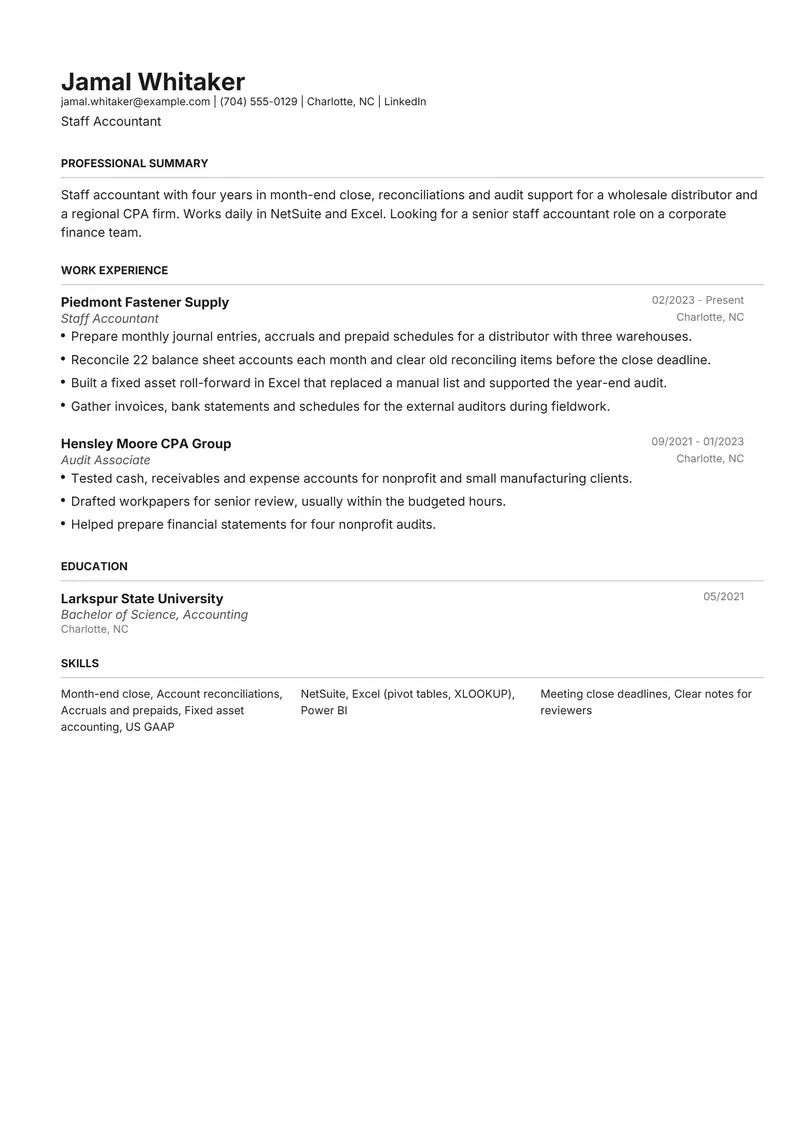
Henrietta makes a sensible Word resume template for accounting and other business roles: a conventional black and grey layout with education right after experience. The DOCX opens in Microsoft Word, where every line can be changed; Google Docs and LibreOffice can import it, though formatting may shift slightly. The fictional sample is a staff accountant whose staffing agency asked for a Word copy.
Download the DOCX sample
Jamal is a fictional staff accountant. Replace every detail with your own before you send it.
The files are made in your browser by Resumity's own exporters, from this sample. The builder opens it as your own resume: click any line to replace it. Free plan, no watermark.
Why Henrietta suits a DOCX resume
Henrietta is the conventional business layout of the seven, with a left-aligned name and black and grey styling, the look a controller or finance manager expects to see. It prints education straight after work experience, so the accounting degree sits directly under the close and audit work rather than below a skills list.
Second choice: Leslie. Leslie also opens with work experience and adds one blue accent in a centred header; pick it if you want a little colour while keeping the jobs first.
What goes in each section, in Henrietta's order
Henrietta prints its sections in a fixed order, the same in the PDF and the Word file. Here is that order for this sample, and what to put in each section.
- Professional Summary. A recruiter who receives the Word file may shorten your summary before passing it to a client. Make it easy to trim: one sentence on role and years, one on your systems, one on the team you want to join.
- Work Experience. Name the processes you own (month-end close, reconciliations, accruals, audit requests) and the size of the business. When you edit the jobs in Word, keep every date in the same MM/YYYY form the sample uses, so retyped dates do not drift into another style.
- Education. Henrietta prints the degree straight under your jobs. Degree, school and graduation year are enough; keep the GPA and coursework only in your first few years out of school.
- Skills. In Henrietta's PDF the skills sit in a three-column grid without group labels, one group per column, so put the accounting methods a controller scans for in the first group and your ERP and spreadsheet tools in the second.
The sample resume as text
The same content as the files above, so you can copy a line or compare it with your own.
Jamal Whitaker
Staff Accountant
Charlotte, NC | jamal.whitaker@example.com | (704) 555-0129 | linkedin.com/in/sample-jamal-whitaker
Staff accountant with four years in month-end close, reconciliations and audit support for a wholesale distributor and a regional CPA firm. Works daily in NetSuite and Excel. Looking for a senior staff accountant role on a corporate finance team.
Experience
Staff Accountant, Piedmont Fastener Supply, Charlotte, NC (02/2023 to Present)
- Prepare monthly journal entries, accruals and prepaid schedules for a distributor with three warehouses.
- Reconcile 22 balance sheet accounts each month and clear old reconciling items before the close deadline.
- Built a fixed asset roll-forward in Excel that replaced a manual list and supported the year-end audit.
- Gather invoices, bank statements and schedules for the external auditors during fieldwork.
Audit Associate, Hensley Moore CPA Group, Charlotte, NC (09/2021 to 01/2023)
- Tested cash, receivables and expense accounts for nonprofit and small manufacturing clients.
- Drafted workpapers for senior review, usually within the budgeted hours.
- Helped prepare financial statements for four nonprofit audits.
Education
Bachelor of Science, Accounting, Larkspur State University (05/2021). Coursework: Intermediate Accounting I and II, Auditing, Cost Accounting
Skills
Month-end close, Account reconciliations, Accruals and prepaids, Fixed asset accounting, US GAAP, NetSuite, Excel (pivot tables, XLOOKUP), Power BI, Meeting close deadlines, Clear notes for reviewers
How to make the sample yours
Save as .docx, not an older Word format
If Word offers Compatibility Mode or the older .doc format, choose Word Document (.docx) instead, and name the file Firstname-Lastname-Resume.docx.
Send a clean file with no tracked changes
Accept or reject every tracked change and delete comments before attaching the Word file. Otherwise the recruiter can see every edit you made while tailoring it.
Check it after editing in Google Docs or LibreOffice
Both can import a DOCX, but spacing, fonts or the right-aligned dates may move. If you edited there, read every line before sending, or make the change in the Resumity builder and export a fresh DOCX.
Keep a PDF of the same version
Send the Word file to the agency that asked for it and a PDF everywhere else. Both come from the same resume in Resumity, so the two copies say the same thing.
Swap the ledger work for your own
Replace the close, reconciliation and audit bullets with the processes you actually run, and name your ERP (NetSuite, Sage Intacct, Dynamics 365) exactly as the posting writes it.
Keywords to keep where they are true
Terms this kind of resume is usually searched for. Use the posting's exact wording, and only for work you have done.
- month-end close
- account reconciliations
- journal entries
- general ledger
- accruals
- fixed assets
- audit support
- US GAAP
- NetSuite
- Excel (pivot tables, XLOOKUP)
- variance analysis
- balance sheet review
Mistakes to avoid
- Attaching a .doc file from an old version of Word or a .pages file from a Mac. Save as .docx before you send it.
- Leaving tracked changes, comments or another person's name in the document properties.
- Assuming the Word file looks identical once a recruiter opens it in Google Docs. Send the PDF too when the layout matters.
- Adding tables, text boxes or a header image in Word to make the page look different. Keep your edits to the words.
How the sample PDF reads in text extractors
We exported this sample with Resumity's PDF exporter in Chrome on 2026-10-29 and read the file back with three open-source text extractors. This shows whether software that turns a PDF into text can recover it; it is not a test of any commercial applicant tracking system. How we test templates.
| Extractor | Name, email, phone | Headings | Bullets intact |
|---|---|---|---|
| pdf.js 4.10.38 | All found | 4 of 4 | 7 of 7 |
| pdftotext (Xpdf) 4.00 | All found | 4 of 4 | 7 of 7 |
| pypdf 6.13.0 | All found | 4 of 4 | 7 of 7 |
Frequently asked questions
When should I send a Word resume instead of a PDF?
When the job ad, the application form or the recruiter asks for one. Staffing agencies sometimes want a Word file so they can format it for a client. Otherwise a PDF keeps your layout fixed.
Can I open the DOCX resume in Google Docs?
Yes. Google Docs can import a DOCX file and you can edit it there, but fonts and spacing may shift slightly. Resumity has no Google Docs integration, so download the DOCX and upload it to Drive yourself.
Is a DOCX file the same as a Word document?
Yes. DOCX is the standard Microsoft Word document format; .doc is the older one. Save as .docx unless someone asks for something else.
How do I keep my Word resume to one page after editing it?
Cut words before you shrink the font or margins. If an edit pushed the last line onto a second page, remove the weakest bullet from your oldest job first.
What if a recruitment agency changes my Word resume?
Agencies may remove your contact details or add their own header before sending it to a client. Ask to see the version they send, and keep your own PDF as the master copy.
Will applicant tracking systems read this Henrietta PDF?
The sample PDF read back with its contact details, all 4 section headings and all 7 bullets intact in three open-source text extractors (pdf.js, pdftotext and pypdf). Commercial systems such as Workday, Greenhouse or Taleo were not tested, and each employer configures its own.
Guides and templates for this resume
More in resume template formats.