Resume template · Updated October 2026
PDF resume template you can email or print
Short answer
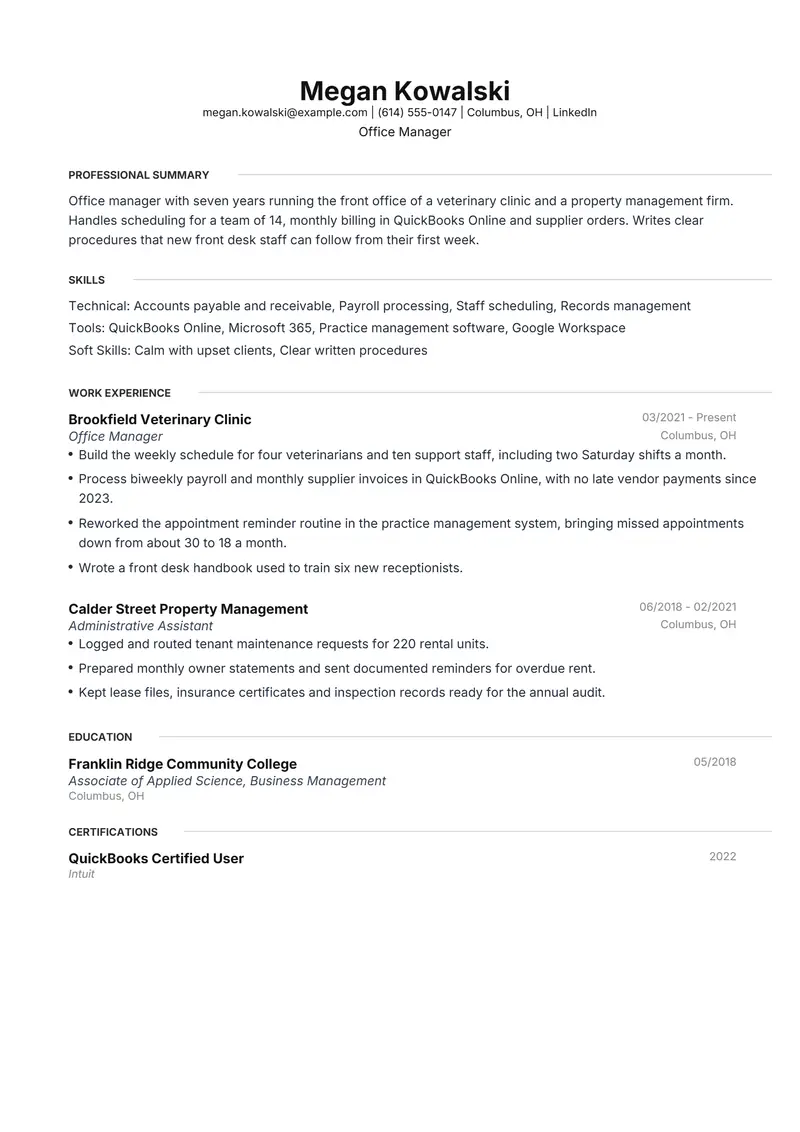
Meridian is the safest PDF resume template here when the file will be both emailed and printed: it uses no colour, so office printers and photocopiers reproduce it cleanly. The PDF is text-based, with selectable text and embedded fonts, on A4 paper. The fictional sample is an office manager at a veterinary clinic who applies by email and brings printed copies to interviews.
Download the PDF sample
Megan is a fictional office manager. Replace every detail with your own before you send it.
The files are made in your browser by Resumity's own exporters, from this sample. The builder opens it as your own resume: click any line to replace it. Free plan, no watermark.
Why Meridian suits a PDF resume
Meridian is built from black text and thin grey rules only, so a printed or photocopied copy looks like the PDF on screen, with no colour block to streak or fade. It prints skills above work experience, which lets an office manager show payroll, scheduling and bookkeeping software before the job history.
Second choice: Olivia. Olivia's full-width blue header band stands out when the PDF is opened on a screen, but on paper it prints as a solid block of colour, so choose it only if your copies will mostly be read as files.
What goes in each section, in Meridian's order
Meridian prints its sections in a fixed order, the same in the PDF and the Word file. Here is that order for this sample, and what to put in each section.
- Professional Summary. Write it for the person holding your printout across an interview table: your title, years in the job, and the size and kind of office you run. Three lines keep the skills rows and your current job high on the sheet.
- Skills. Meridian prints skills as labelled rows (Technical, Tools, Soft Skills). Name the real software, such as QuickBooks Online or Microsoft 365, rather than "computer skills"; an office owner wants to know whether you can run their system on day one.
- Work Experience. Lead each bullet with work an owner would notice if it stopped: payroll out on time, invoices paid, supplies reordered, new staff trained. Two jobs with three or four bullets each fit one A4 page with room left for education and a certificate.
- Education. Degree or diploma, school and year on one line. With several years of office work behind you, coursework and grades can go.
- Certifications. A bookkeeping or software credential prints after education, at the foot of the page. If the job ad names that software, repeat the credential in your summary so it is read in the opening lines.
The sample resume as text
The same content as the files above, so you can copy a line or compare it with your own.
Megan Kowalski
Office Manager
Columbus, OH | megan.kowalski@example.com | (614) 555-0147 | linkedin.com/in/sample-megan-kowalski
Office manager with seven years running the front office of a veterinary clinic and a property management firm. Handles scheduling for a team of 14, monthly billing in QuickBooks Online and supplier orders. Writes clear procedures that new front desk staff can follow from their first week.
Experience
Office Manager, Brookfield Veterinary Clinic, Columbus, OH (03/2021 to Present)
- Build the weekly schedule for four veterinarians and ten support staff, including two Saturday shifts a month.
- Process biweekly payroll and monthly supplier invoices in QuickBooks Online, with no late vendor payments since 2023.
- Reworked the appointment reminder routine in the practice management system, bringing missed appointments down from about 30 to 18 a month.
- Wrote a front desk handbook used to train six new receptionists.
Administrative Assistant, Calder Street Property Management, Columbus, OH (06/2018 to 02/2021)
- Logged and routed tenant maintenance requests for 220 rental units.
- Prepared monthly owner statements and sent documented reminders for overdue rent.
- Kept lease files, insurance certificates and inspection records ready for the annual audit.
Education
Associate of Applied Science, Business Management, Franklin Ridge Community College (05/2018)
Certifications
- QuickBooks Certified User, Intuit (2022)
Skills
Accounts payable and receivable, Payroll processing, Staff scheduling, Records management, QuickBooks Online, Microsoft 365, Practice management software, Google Workspace, Calm with upset clients, Clear written procedures
How to make the sample yours
Rename the file before you attach it
The download is named after this page. Save your copy as Firstname-Lastname-Resume.pdf so it is easy to find among the other attachments in a hiring manager's inbox.
Print a test sheet on US Letter paper
Resumity's PDF is A4, which is a little narrower and taller than US Letter. In the print dialog choose Fit or Shrink to fit so the bottom line is not cut off, then check the margins on the test copy.
Make changes in the builder, not a PDF editor
Editing words inside a PDF editor can swap the embedded font or break the line spacing. Open the sample in the builder, click the line you want to change and export a fresh PDF.
Confirm the text still selects
Open your final file and drag across a bullet. If the words highlight, the PDF is still text-based. If you ever scanned or photographed a printed copy, send the original export instead of the scan.
Replace the clinic with your own office
Swap the veterinary clinic and property office for your employers and keep only figures you can explain in an interview: staff scheduled, units managed, invoices handled each month.
Keywords to keep where they are true
Terms this kind of resume is usually searched for. Use the posting's exact wording, and only for work you have done.
- office management
- staff scheduling
- accounts payable
- accounts receivable
- QuickBooks Online
- payroll processing
- vendor management
- Microsoft 365
- front desk operations
- records management
- new hire onboarding
- supply ordering
Mistakes to avoid
- Sending a phone photo or scan of a printed resume. That creates an image, and nobody can select, copy or search the text.
- Password-protecting the PDF or blocking printing. A reviewer who cannot open or print the file has no reason to ask you for another copy.
- Handing over copies from a printer low on toner. Print one sheet first and check that the grey rules and right-aligned dates are visible.
- Attaching the file under its download name. A resume called pdf-resume-template.pdf looks unfinished before it is opened.
How the sample PDF reads in text extractors
We exported this sample with Resumity's PDF exporter in Chrome on 2026-10-29 and read the file back with three open-source text extractors. This shows whether software that turns a PDF into text can recover it; it is not a test of any commercial applicant tracking system. How we test templates.
| Extractor | Name, email, phone | Headings | Bullets intact |
|---|---|---|---|
| pdf.js 4.10.38 | All found | 5 of 5 | 7 of 7 |
| pdftotext (Xpdf) 4.00 | All found | 5 of 5 | 7 of 7 |
| pypdf 6.13.0 | All found | 5 of 5 | 7 of 7 |
Frequently asked questions
Should I send my resume as a PDF or a Word file?
Send a PDF unless the job ad or recruiter asks for Word. A PDF looks the same on every screen and printer; a Word file is for someone who needs to edit it. Resumity exports both from the same resume, so you can send whichever is requested.
Will an A4 PDF resume print on US Letter paper?
Yes, if the printer is allowed to scale it. A4 is slightly taller than Letter, so pick "Fit" or "Shrink to fit" in the print dialog; the page shrinks a little and the last line stays on the sheet.
Can I edit the PDF after downloading it?
Small fixes in a PDF editor are possible but can change fonts and spacing. It is cleaner to edit the resume in the Resumity builder, or edit the Word (DOCX) copy, and export a new PDF.
Should I print my resume in colour?
Black and grey is enough for a printed resume and photocopies cleanly, which is why Meridian uses no colour at all. If you choose a template with a blue header, print one test page to see how the colour comes out.
Is this PDF resume template free?
Yes. You can download the sample PDF on this page, and the builder exports PDF and Word files on the free plan with no watermark.
Will applicant tracking systems read this Meridian PDF?
The sample PDF read back with its contact details, all 5 section headings and all 7 bullets intact in three open-source text extractors (pdf.js, pdftotext and pypdf). Commercial systems such as Workday, Greenhouse or Taleo were not tested, and each employer configures its own.
Guides and templates for this resume
More in resume template formats.