Resume template · Updated October 2026
Plain text resume template for copy and paste forms
Short answer
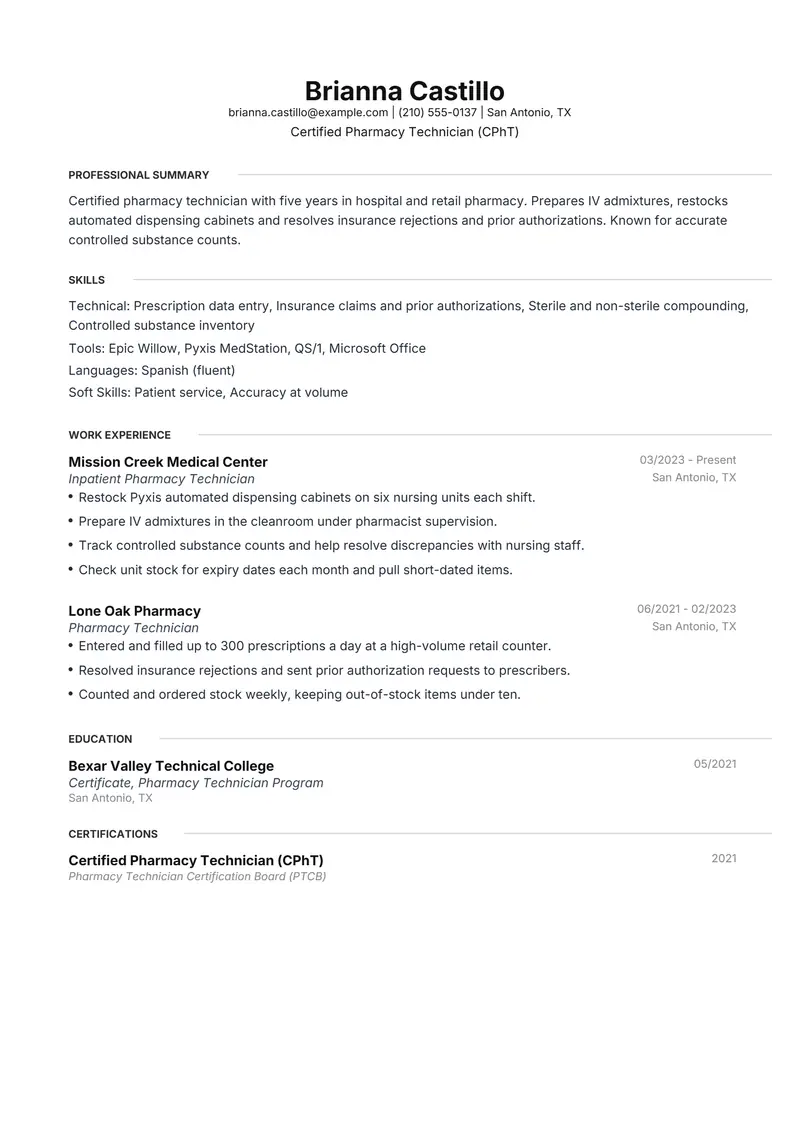
Resumity's builder has no .txt download; it exports PDF and DOCX. For a plain text version, build the resume in Meridian, which is one column with no colour and skill rows labelled with ordinary colons, then save the DOCX as plain text in Word or Google Docs and tidy the result. The fictional sample is a pharmacy technician whose resume often goes into paste-in boxes on hospital and pharmacy chain application forms.
Download the plain text sample
Brianna is a fictional certified pharmacy technician (CPhT). Replace every detail with your own before you send it.
The files are made in your browser by Resumity's own exporters, from this sample. The builder opens it as your own resume: click any line to replace it. Free plan, no watermark.
Why Meridian suits a plain text resume
Meridian has very little that depends on formatting: one column, no colour, standard section names, and skill rows written as a label, a colon and a list. A plain colon survives being pasted into a text box, so the text version needs little repair beyond line spacing and bullet characters.
Second choice: FAANGPath. FAANGPath has the same order and look but puts a middle dot between each skill label and its list; in the plain version, retype that dot as a colon.
What goes in each section, in Meridian's order
Meridian prints its sections in a fixed order, the same in the PDF and the Word file. Here is that order for this sample, and what to put in each section.
- Professional Summary. Three sentences, no symbols. In a paste box this paragraph is often the first thing a reader meets, with no bold name or layout above it to set the tone.
- Skills. Meridian already writes each row as "Technical: ...", which is exactly how a plain-text skills section should read. Separate items with commas, not slashes or symbols.
- Work Experience. Put title, employer, city and dates together on one line, because right-aligned dates lose their place in plain text. When you convert, start each bullet with a hyphen.
- Education. Program, school, city and year on one line. Plain text has no columns, so nothing should rely on sitting beside something else.
- Certifications. Write the credential in full with its abbreviation in brackets, then the issuer and year. Without styling, a reader tells a credential from a heading by its wording alone.
The sample resume as text
The same content as the files above, so you can copy a line or compare it with your own.
Brianna Castillo
Certified Pharmacy Technician (CPhT)
San Antonio, TX | brianna.castillo@example.com | (210) 555-0137
Certified pharmacy technician with five years in hospital and retail pharmacy. Prepares IV admixtures, restocks automated dispensing cabinets and resolves insurance rejections and prior authorizations. Known for accurate controlled substance counts.
Experience
Inpatient Pharmacy Technician, Mission Creek Medical Center, San Antonio, TX (03/2023 to Present)
- Restock Pyxis automated dispensing cabinets on six nursing units each shift.
- Prepare IV admixtures in the cleanroom under pharmacist supervision.
- Track controlled substance counts and help resolve discrepancies with nursing staff.
- Check unit stock for expiry dates each month and pull short-dated items.
Pharmacy Technician, Lone Oak Pharmacy, San Antonio, TX (06/2021 to 02/2023)
- Entered and filled up to 300 prescriptions a day at a high-volume retail counter.
- Resolved insurance rejections and sent prior authorization requests to prescribers.
- Counted and ordered stock weekly, keeping out-of-stock items under ten.
Education
Certificate, Pharmacy Technician Program, Bexar Valley Technical College (05/2021)
Certifications
- Certified Pharmacy Technician (CPhT), Pharmacy Technician Certification Board (PTCB) (2021)
Skills
Prescription data entry, Insurance claims and prior authorizations, Sterile and non-sterile compounding, Controlled substance inventory, Epic Willow, Pyxis MedStation, QS/1, Microsoft Office, Patient service, Accuracy at volume, Spanish (fluent)
How to make the sample yours
Make the text copy from the DOCX
Open the DOCX in Word and use Save As with the Plain Text (.txt) type, or in Google Docs choose File, Download, Plain text. Keep the formatted version for any form that accepts an upload.
Capitalise the headings
With no bold or rules, write section headings in capitals (PROFESSIONAL SUMMARY, WORK EXPERIENCE) and leave a blank line before each.
Replace special characters
Swap round bullets, curly quotes and long dashes for hyphens and straight quotes. Check accented letters in names and places after pasting.
Keep lines short
In an email body, lines of around 65 characters wrap cleanly on most screens. Press Enter at the end of each bullet rather than relying on automatic wrapping.
Preview before you submit
After pasting into a form, use its preview if it has one, and fix run-together lines or stray symbols. For email, send it to yourself and read it on a phone first.
Keywords to keep where they are true
Terms this kind of resume is usually searched for. Use the posting's exact wording, and only for work you have done.
- pharmacy technician
- CPhT
- prescription processing
- medication dispensing
- insurance claims
- prior authorizations
- IV admixture
- sterile compounding
- controlled substances
- automated dispensing cabinets
- inventory management
- HIPAA
- customer service
Mistakes to avoid
- Pasting text from a PDF straight into a form without reading it back. Line breaks and bullets often need fixing.
- Tabs, columns or rows of spaces used to line things up. Alignment collapses in plain text.
- Long decorative dividers made of symbols. A blank line and a capitalised heading separate sections well enough.
- Letting the text copy fall out of date. Each time you update the resume in the builder, make a fresh plain version.
How the sample PDF reads in text extractors
We exported this sample with Resumity's PDF exporter in Chrome on 2026-10-29 and read the file back with three open-source text extractors. This shows whether software that turns a PDF into text can recover it; it is not a test of any commercial applicant tracking system. How we test templates.
| Extractor | Name, email, phone | Headings | Bullets intact |
|---|---|---|---|
| pdf.js 4.10.38 | All found | 5 of 5 | 7 of 7 |
| pdftotext (Xpdf) 4.00 | All found | 5 of 5 | 7 of 7 |
| pypdf 6.13.0 | All found | 5 of 5 | 7 of 7 |
Frequently asked questions
What is a plain text resume?
A version of your resume with no formatting at all: no fonts, bold, columns or bullet symbols beyond simple characters. It is meant for pasting into online application boxes and the body of an email.
When do I need a plain text resume?
When an application form asks you to paste your resume into a box instead of attaching it, when an employer wants it in the email body, or when a job board strips formatting from what you submit.
How should a plain text resume be laid out?
Name and contact details at the top, each on its own line, then capitalised section headings with a blank line before each. Each job gets one line for title, employer and dates, followed by bullets that start with a hyphen.
Which characters should I avoid?
Round bullets, curly quotation marks, long dashes, arrows and other special symbols, which some forms show as boxes or question marks. Hyphens, asterisks and straight quotes are safe.
Should I still keep a formatted resume?
Yes. Use the formatted version wherever a form lets you attach it, and the plain text only where pasting is the only option.
Will applicant tracking systems read this Meridian PDF?
The sample PDF read back with its contact details, all 5 section headings and all 7 bullets intact in three open-source text extractors (pdf.js, pdftotext and pypdf). Commercial systems such as Workday, Greenhouse or Taleo were not tested, and each employer configures its own.
Guides and templates for this resume
More in resume template styles.